
Running a business means dealing with countless repetitive tasks every day. Answering the same customer questions, responding to website visitors, collecting leads, scheduling appointments, and providing basic support can take hours that could be spent on more important work.
This is where AI chatbots can make a significant difference.
Modern AI chatbots can communicate with customers in natural language, understand questions, provide relevant information, collect customer details, and perform routine tasks automatically. Instead of replacing your team, an AI chatbot can handle repetitive conversations so your employees can focus on work that requires human attention.
Whether you run a small local business, an online store, a professional service company, or a growing enterprise, AI chatbot automation can help you save time, improve customer service, and capture more opportunities.
Here are seven practical ways AI chatbots can automate your business.
1. Automate Customer Questions and FAQs
One of the simplest and most effective uses of an AI chatbot is answering frequently asked questions.
Most businesses receive many questions that have already been answered on their website. Customers may ask about pricing, services, opening hours, locations, delivery, return policies, availability, or how a particular service works.
Your team may spend a considerable amount of time answering these questions individually.
An AI chatbot can handle many of these conversations automatically.
For example, a customer visiting a service business website might ask:
“What services do you offer?”
The chatbot can immediately explain the available services.
A customer might then ask:
“How much does it cost?”
The chatbot can provide the relevant pricing information if that information has been provided to it.
This creates a faster experience for the customer while reducing repetitive work for your staff.
Why this matters
Automating FAQs can help your business:
- Reduce repetitive customer inquiries
- Provide instant answers
- Make information easier to find
- Free employees from routine questions
- Improve the overall website experience
- Provide support outside normal business hours
Instead of making customers search through multiple pages or wait for an email response, they can simply ask the chatbot.
2. Capture and Qualify Leads Automatically
Generating leads is important, but collecting a lead is only the beginning.
Businesses also need to determine whether a potential customer is actually interested, what they need, and whether they are a good fit.
An AI chatbot can help automate this process.
When someone visits your website, the chatbot can start a conversation and ask relevant questions.
For example:
Chatbot: “What service are you interested in?”
Visitor: “Website development.”
Chatbot: “Are you looking for a new website or an improvement to an existing website?”
Visitor: “A new website.”
The chatbot can then collect information such as the visitor’s name, email address, phone number, company name, requirements, budget range, or preferred timeframe.
Instead of simply collecting a generic contact form submission, your sales team can receive a more useful lead with relevant information already attached.
Turn website traffic into opportunities
Many visitors leave a website without contacting the business. They may have questions, be unsure about the right service, or simply not be ready to fill out a traditional contact form.
A chatbot can engage these visitors and encourage them to take the next step.
It can help:
- Capture contact information
- Identify customer requirements
- Ask qualifying questions
- Recommend relevant services
- Direct high-intent visitors toward a consultation
- Send qualified leads to your sales team
This allows your website to work as a lead-generation tool even when your team isn’t available.
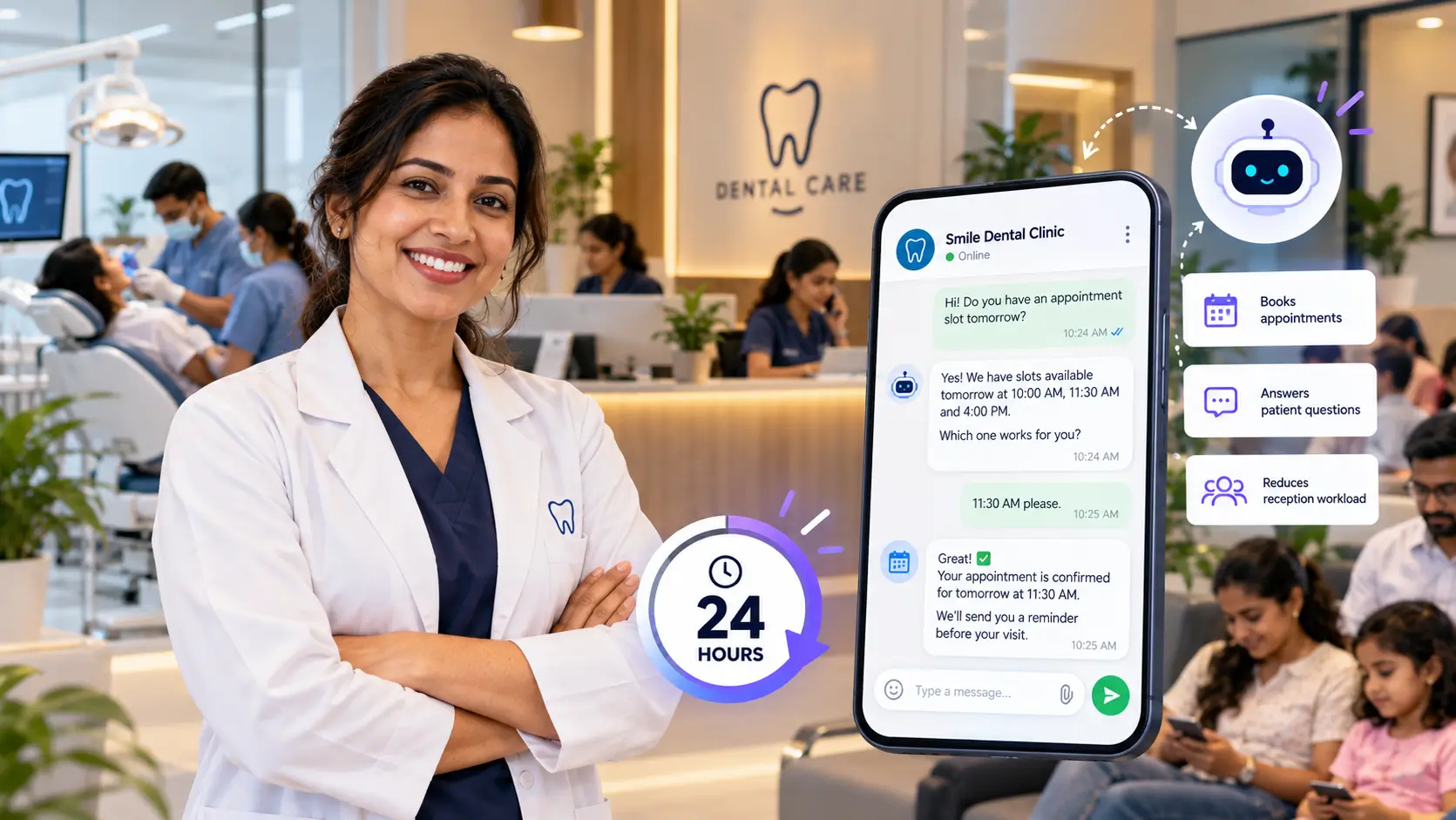
3. Automate Appointment Booking
Scheduling appointments can create unnecessary back-and-forth communication.
A customer may send an email asking about availability. Someone from your team responds with a few available times. The customer chooses one, but then another message may be needed to confirm the appointment.
An AI chatbot can simplify this process.
Depending on how your business is set up, a chatbot can help visitors find the appropriate service, collect their information, and guide them toward booking an appointment.
For example, a customer could ask:
“I’d like to schedule a consultation.”
The chatbot can ask what type of consultation they need and then guide them to the appropriate booking option.
This can be especially useful for:
- Consultants
- Healthcare and wellness businesses
- Salons and beauty businesses
- Real estate agencies
- Law firms
- Financial professionals
- Marketing agencies
- Home service businesses
- Professional service providers
Less scheduling work for your team
Automating the initial appointment process means employees don’t have to spend as much time coordinating basic scheduling requests.
Customers also get a faster experience because they don’t necessarily have to wait for someone to respond.
4. Automate Basic Customer Support
Customer support doesn’t always involve complicated problems.
A large portion of support requests can involve simple questions such as:
- Where is my order?
- What are your business hours?
- How do I get started?
- What is your return policy?
- How can I change my appointment?
- Which service should I choose?
- Where can I find a particular document?
- How do I contact your team?
An AI chatbot can handle many routine questions immediately.
This doesn’t mean every customer conversation needs to be handled by AI.
Instead, the chatbot can act as the first layer of support.
AI for simple questions, humans for complex issues
A useful approach is to let the chatbot handle routine conversations and transfer more complicated situations to a human representative.
For example:
Customer: “I need help with my account.”
Chatbot: “I can help with that. What would you like to do?”
If the customer has a simple question, the chatbot can provide the appropriate information.
If the issue requires human assistance, the conversation can be directed to the appropriate member of the team.
This creates a balance between automation and human support.
Customers get quick answers to simple questions, while employees can spend more time solving complex problems.
5. Provide 24/7 Website Assistance
Your business may operate during specific hours, but your website is available around the clock.
Visitors can arrive at your website late at night, early in the morning, on weekends, or during holidays.
Without a chatbot, those visitors may have to wait until your business opens before they can get assistance.
An AI chatbot can provide basic assistance 24/7.
This is particularly valuable for businesses that receive customers from different locations or time zones.
Imagine someone visiting your website at 11:30 PM. They have a question about your service and are considering contacting your business tomorrow.
Instead of leaving the website and potentially forgetting about it, they can ask the chatbot immediately.
The chatbot can answer their question, collect their contact information, or guide them toward the next step.
Every visitor becomes an opportunity
24/7 availability doesn’t necessarily mean your team needs to work 24/7.
AI can handle the first interaction while your employees take over when human involvement is required.
That means your business can continue engaging visitors even outside regular working hours.
6. Automate Product and Service Recommendations
Customers often know what they want to achieve but aren’t sure which product or service is right for them.
For example, a visitor might say:
“I need help getting more customers, but I don’t know which service I need.”
A chatbot can ask questions about the customer’s situation and recommend an appropriate option based on the information available to it.
For an e-commerce business, the chatbot might help shoppers find products based on their preferences.
For a professional service business, it could help visitors identify the most relevant service.
For example:
Visitor: “I need help with my business website.”
Chatbot: “Are you looking for a completely new website or help improving your existing website?”
Based on the answer, the chatbot can guide the visitor toward the relevant service.
Make your website easier to navigate
Not every visitor wants to browse through multiple pages to understand what a business offers.
An AI chatbot can act like a digital guide.
It can help visitors:
- Find products
- Discover services
- Understand differences between options
- Get answers before making a decision
- Find relevant pages
- Take the next step
This can make the buying process simpler and more conversational.
7. Automate Follow-Ups and Customer Engagement
One of the biggest challenges for businesses is following up consistently.
A potential customer may express interest but not immediately make a purchase. A salesperson may need to follow up later, but busy teams can easily miss opportunities.
AI-powered automation can help businesses create more consistent follow-up processes.
For example, after a visitor provides their contact details, the business can use its connected marketing or CRM systems to continue the appropriate follow-up process.
A chatbot can also encourage visitors to take the next step during the initial conversation, such as:
- Requesting a quote
- Booking a consultation
- Starting a purchase
- Submitting an inquiry
- Contacting a sales representative
The goal isn’t to send customers endless automated messages.
The goal is to make sure genuine opportunities don’t disappear simply because someone forgot to follow up.
AI Chatbot Automation Isn’t Just About Saving Time
The biggest benefit of AI chatbots isn’t simply that they can answer questions faster.
The real value comes from connecting conversations to business processes.
A well-designed chatbot can become part of your customer journey.
A visitor arrives on your website.
The chatbot answers their question.
It identifies what they need.
It collects their information.
It recommends the appropriate service.
It helps them book an appointment or request a quote.
The information can then be passed to the appropriate team.
What previously required several manual steps can become a much more streamlined process.
What Should You Automate First?
You don’t need to automate everything at once.
The best place to start is usually with repetitive tasks that happen frequently and don’t require complex human judgment.
Consider automating:
Frequently asked questions
Start with questions your team answers repeatedly.
Lead collection
Ask visitors for the information your sales team actually needs.
Appointment requests
Guide customers toward your booking process.
Basic customer support
Handle common questions before escalating complex issues.
Service discovery
Help visitors find the right product or service.
After-hours inquiries
Give website visitors a way to get assistance when your team is unavailable.
Once these processes are working well, you can gradually expand your automation.
How NexChatBot Can Help Your Business
AI chatbot automation doesn’t have to mean creating a complicated technology system from scratch.
With a platform like NexChatBot, businesses can use AI-powered conversations to automate common customer interactions and make their websites more useful.
Instead of simply displaying information, your website can actively communicate with visitors.
A chatbot can help answer questions, capture leads, guide customers toward the right service, and provide assistance around the clock.
The result is a website that can do more than simply look good—it can help your business operate more efficiently and turn more visitors into customers.
Final Thoughts
AI chatbots are becoming an increasingly practical tool for businesses of all sizes.
They can automate repetitive conversations, capture leads, answer customer questions, assist with appointments, provide after-hours support, recommend products or services, and help businesses maintain consistent customer engagement.
The key is not to automate every interaction.
Instead, identify the repetitive tasks that consume your team’s time and determine where AI can handle the first step.
When implemented correctly, an AI chatbot can work alongside your employees rather than replace them—handling routine conversations while your team focuses on customers, strategy, sales, and other work that requires a human touch.
For businesses looking to save time, improve customer experiences, and capture more opportunities, AI chatbot automation can be a practical place to start.
Ready to Automate Your Business?
Your website could be doing more than simply providing information. An AI chatbot can help you engage visitors, answer questions, capture leads, and support customers around the clock.
Explore how NexChatBot can help automate your customer conversations and turn more website visitors into opportunities.